Quant
System Structure
워치리스트 종목의 결정적(deterministic) 시그널 스코어링
없음 (사전학습 모델 활용)
데스크톱 터미널에서 수동 판단 보조 (자동 매매 없음)
Editor Summary주식·ETF 추적용 오픈소스 데스크톱 터미널입니다. 관심종목 워치리스트, 보유 종목 기반 뉴스, 실적 일정, 차트 주석, 매크로 지표 오버레이, 시그널 스코어링 기능을 제공합니다. 유료 API 계약 없이 공개 시장 데이터로 동작하며, AI 기능이 필요한 경우 OpenAI 호환 로컬 LLM 서버를 연결해 선택적으로 사용할 수 있습니다.
| Repository | eisenjimmy/Quant |
|---|---|
| Creator | eisenjimmy |
| Stars / Forks | ★ 66 / 12 |
| License | MIT |
| Last Updated | 2026-07-07 |
| Snapshot Date | 2026-07-08 (README below is a copy from this date) |
This is third-party open-source code. QuantField does not guarantee its behavior or safety. Review the code before installing or running it.
README
Quant
Quant is an open-source desktop market terminal for tracking ETFs and stocks. It combines a watchlist, holdings-driven news, earnings context, annotated charts, macro overlays, signal scoring, and an optional local Quant AI agent.
The core promise is simple: useful market context without paid API lock-in. Quant can run with public market data sources, deterministic signal analysis, and a local OpenAI-compatible LLM server when you want AI responses. No cloud LLM API key is required for the default experience.
What Quant Does
Quant is built for quick market scanning:
- Track ETFs and stocks in a desktop watchlist.
- Expand ETF holdings into a broader market universe.
- Read holdings-driven news and upcoming earnings.
- Open a full candlestick chart with pivots, support, resistance, and risk levels.
- Screen the bundled U.S. stock universe for end-of-day technical signals such as cup bases, moving-average alignment, near-high setups, VCP, volume surges, MACD, and RS strength.
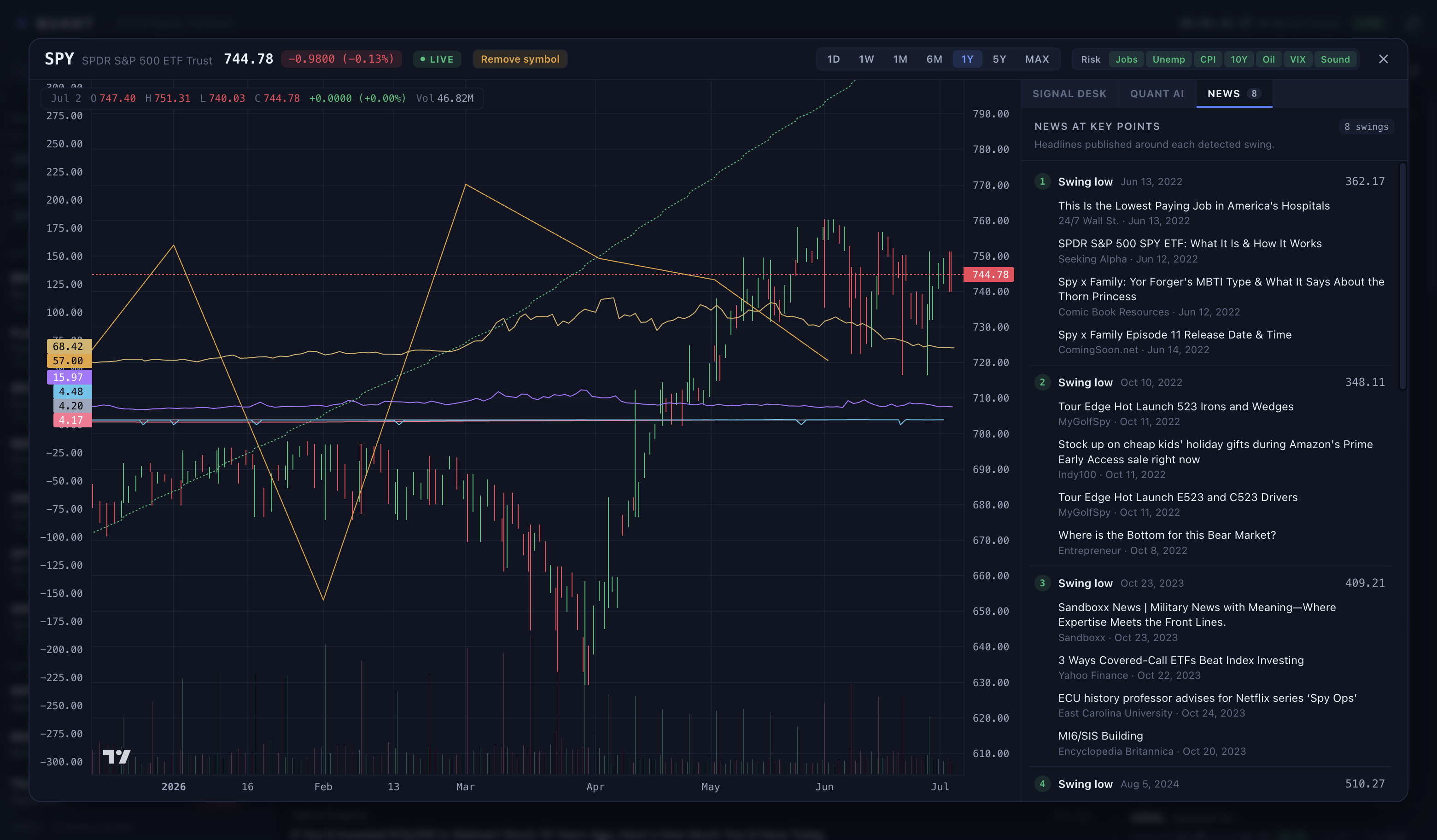
- Inspect news at each detected swing so price action can be read with the surrounding headline context.
- Toggle macro overlays directly on the chart: jobs, unemployment, CPI, 10Y yield, oil, and VIX.
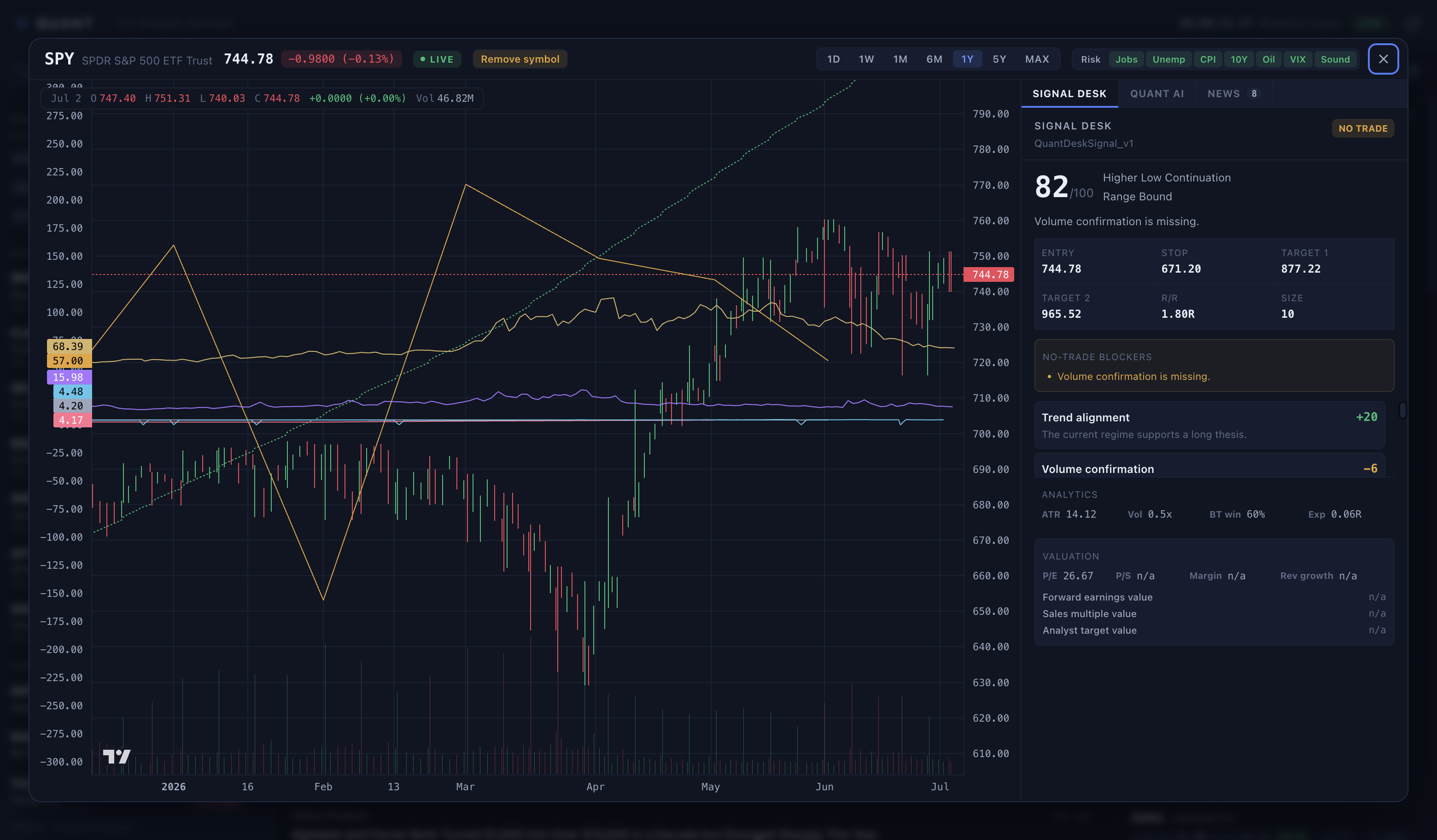
- Review a deterministic Signal Desk before asking an AI agent.
- Use Quant AI with no paid cloud LLM API cost by staying in deterministic mode or running a local model server.
Try It
There are two practical ways to try Quant.
Option 1: Run the Checked-In Release Build
Clone the repository:
git clone https://github.com/eisenjimmy/Quant.git
cd Quant
macOS:
open release/Quant-mac-arm64/Quant.app
Windows PowerShell:
.\release\Quant-win-x64\Quant.exe
Use git clone for the checked-in release folders. The macOS app bundle contains framework symlinks, and git preserves them correctly.
If macOS blocks the unsigned app, open System Settings and allow the app after the first blocked launch. The app is ad-hoc signed for local use but not Apple-notarized.
Option 2: Run From Source
Requirements:
- Node.js 20 or newer
- npm
- macOS or Windows
- Internet access for live public market data
macOS or Linux shell:
git clone https://github.com/eisenjimmy/Quant.git
cd Quant
npm install
npm run typecheck
npm start
Windows PowerShell:
git clone https://github.com/eisenjimmy/Quant.git
cd Quant
npm install
npm run typecheck
npm start
npm start builds the Electron app and launches the desktop window.
Screenshots
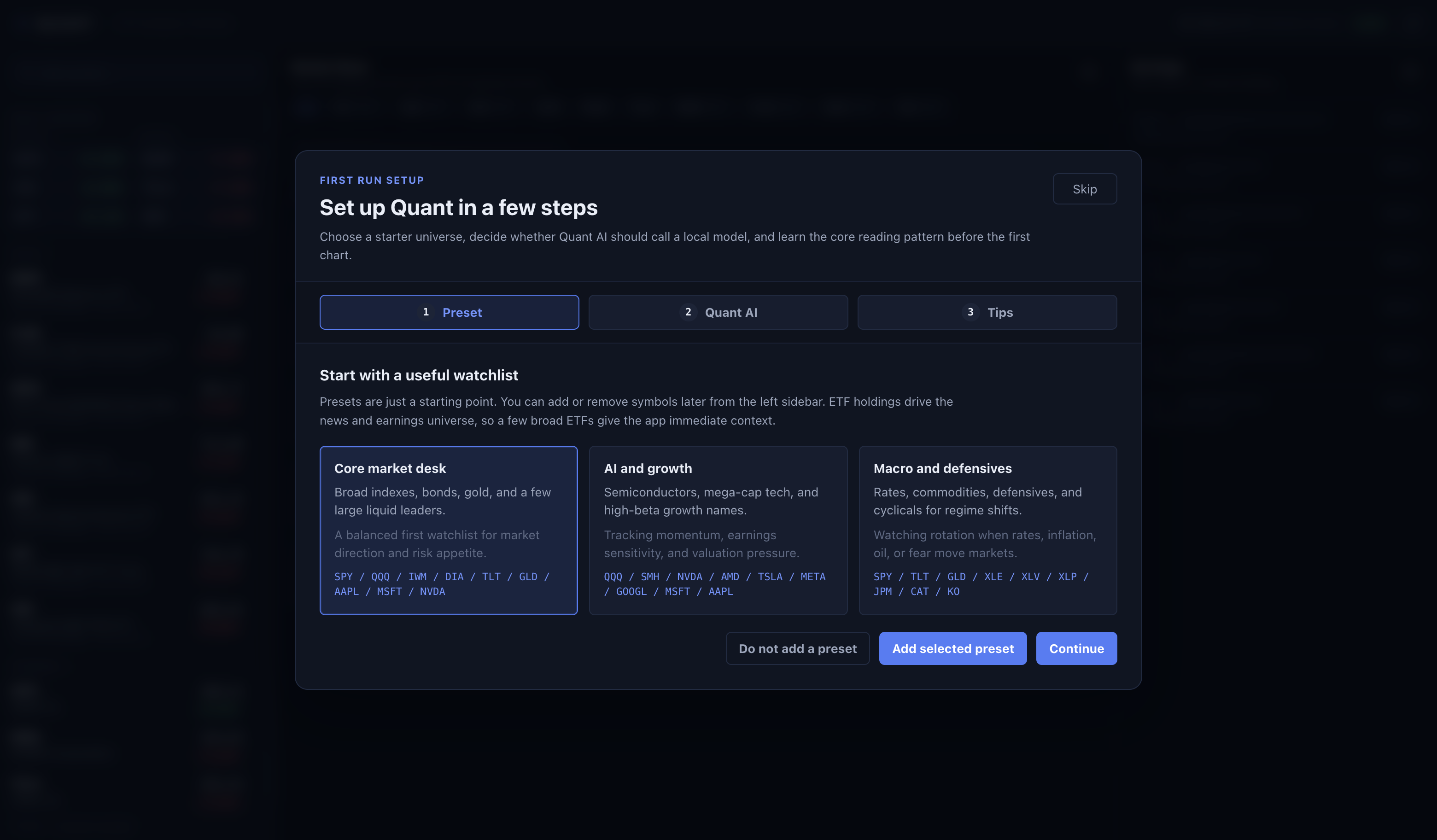
First-Run Onboarding
The onboarding wizard helps a new user choose a starter watchlist, decide whether to enable local LLM calls, and understand the basic reading flow.
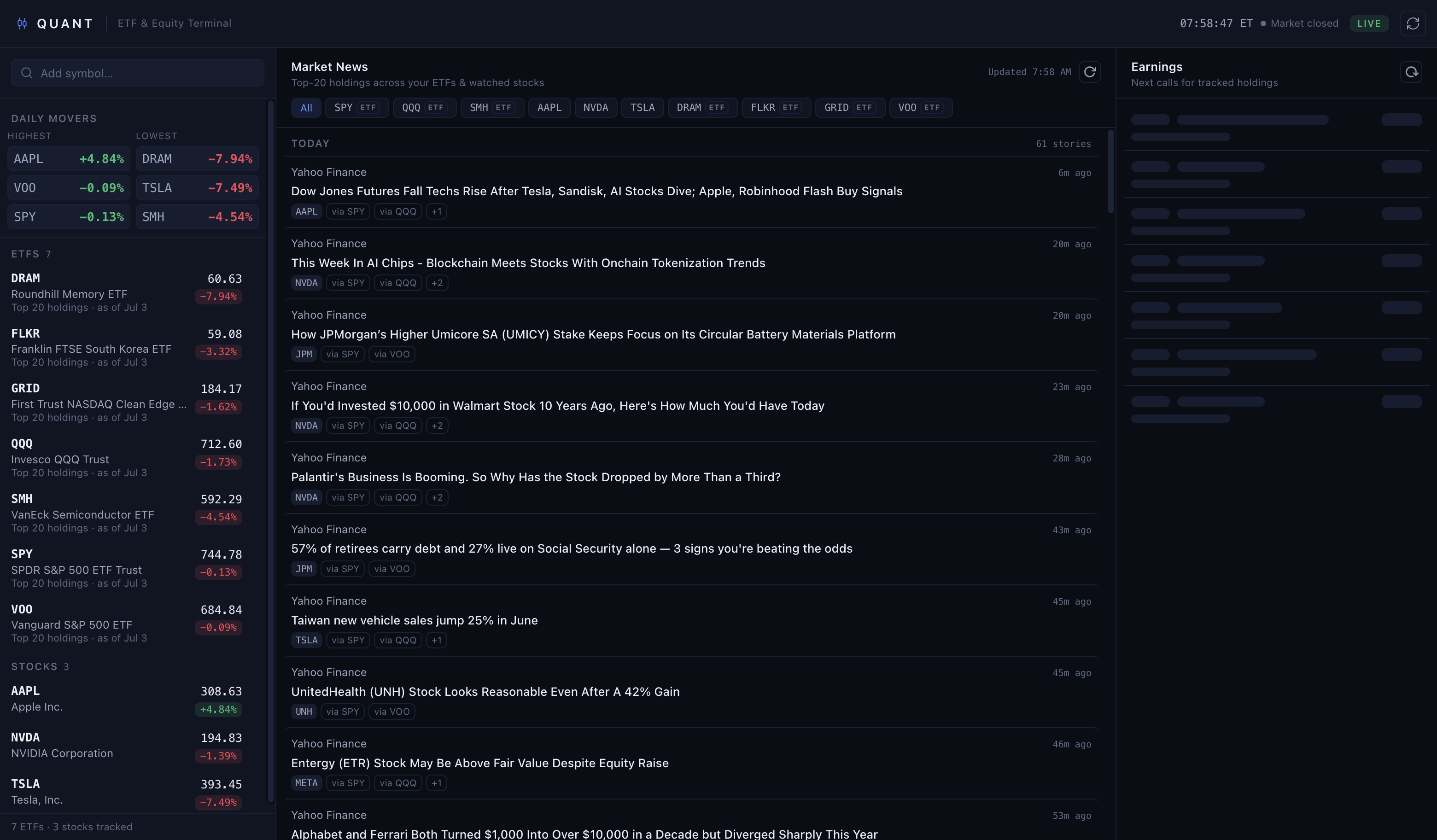
Market Dashboard
The main screen keeps the app dense and practical: watchlist on the left, holdings-driven news in the center, and earnings context on the right.
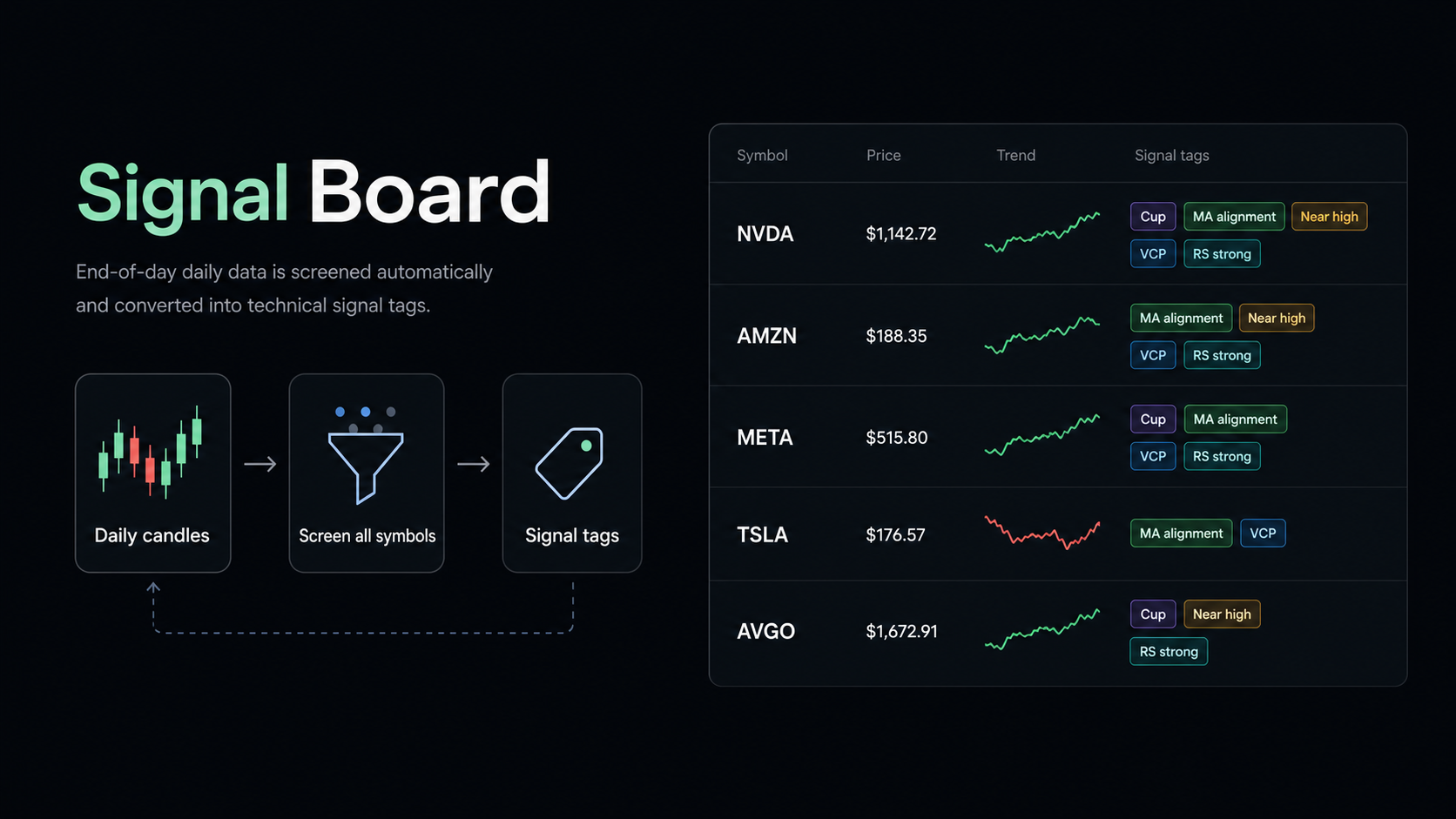
Signal Board
The Signal Board turns daily candles into a compact scanner view. Quant runs deterministic pattern rules across the selected universe, ranks matching symbols, and labels each row with signal tags such as Cup, MA alignment, Near high, VCP, MACD, and RS strong.
Today the scanner covers the app's bundled U.S. stock directory plus optional watchlist/ETF modes. The API boundary is intentionally separated from the UI so a production bulk end-of-day feed can replace the bundled universe when full-market coverage is required.
Chart Modal and Signal Desk
Opening a symbol brings up the full chart workspace: candlesticks, volume, pivots, risk levels, deterministic signal scoring, valuation context, and earnings context.
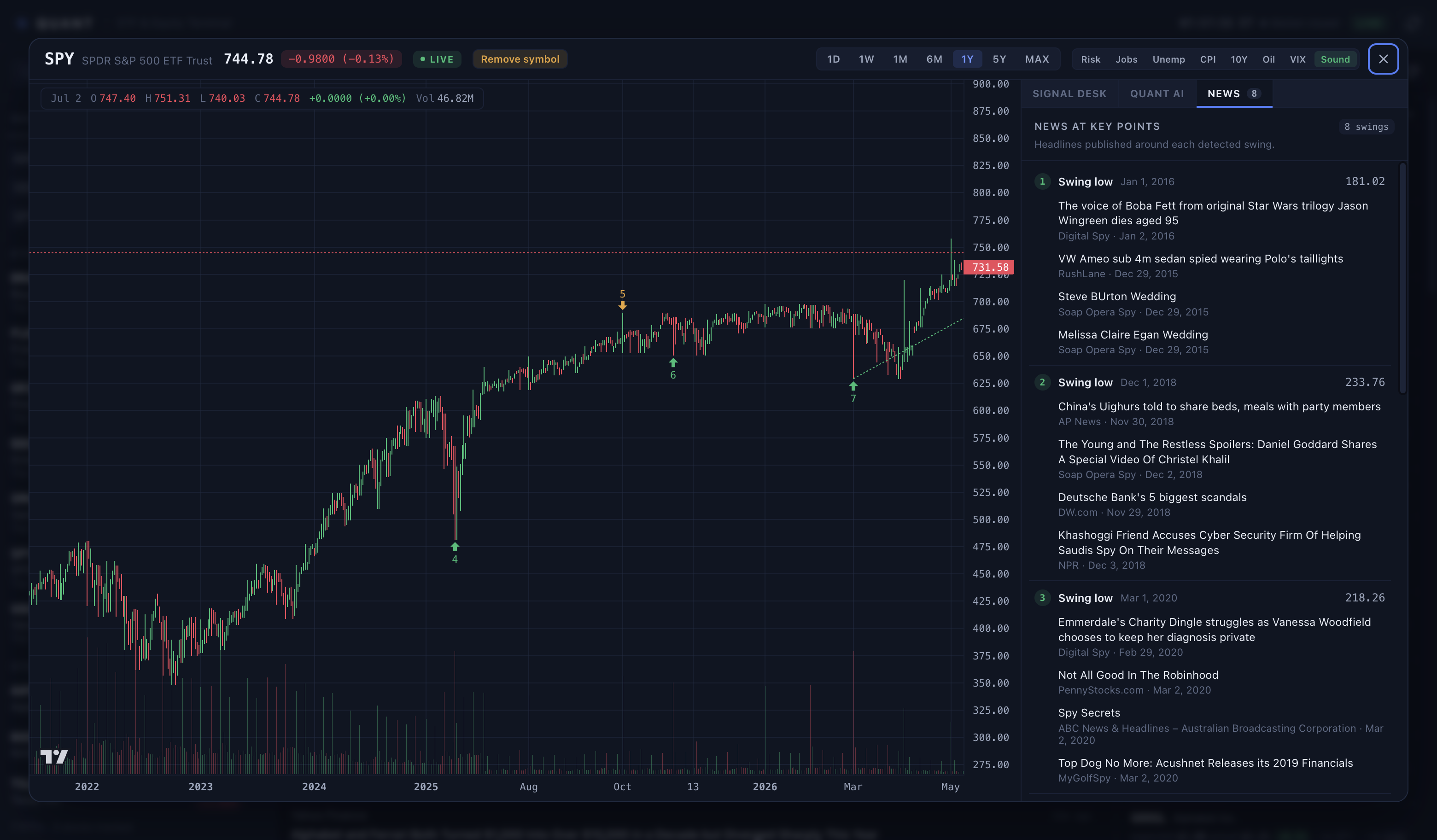
News at Each Swing
Quant detects swing highs and swing lows, numbers the key points, and groups headlines published around each swing. The goal is to make price movement explainable: a user can click through the swing list and compare chart pivots against the news available near that date.
Macro Overlay System
Quant can layer multiple macro series directly over the active price chart. This is useful when a setup depends on rates, labor data, inflation, oil, volatility, or broad risk appetite.
Available chart overlays:
| Overlay | Why It Matters |
|---|---|
| Jobs | Frames economic momentum and sector rotation risk |
| Unemployment | Helps identify labor-cycle stress or late-cycle cooling |
| CPI | Connects inflation pressure to rates, margins, and multiples |
| 10Y yield | Acts as a discount-rate anchor for equity and ETF valuation |
| Oil | Affects energy, transport, inflation, and consumer-margin pressure |
| VIX | Shows market fear, expected volatility, and stop-width regime |
| Risk | Draws entry, stop, target, and position sizing context |
Quant AI Agent
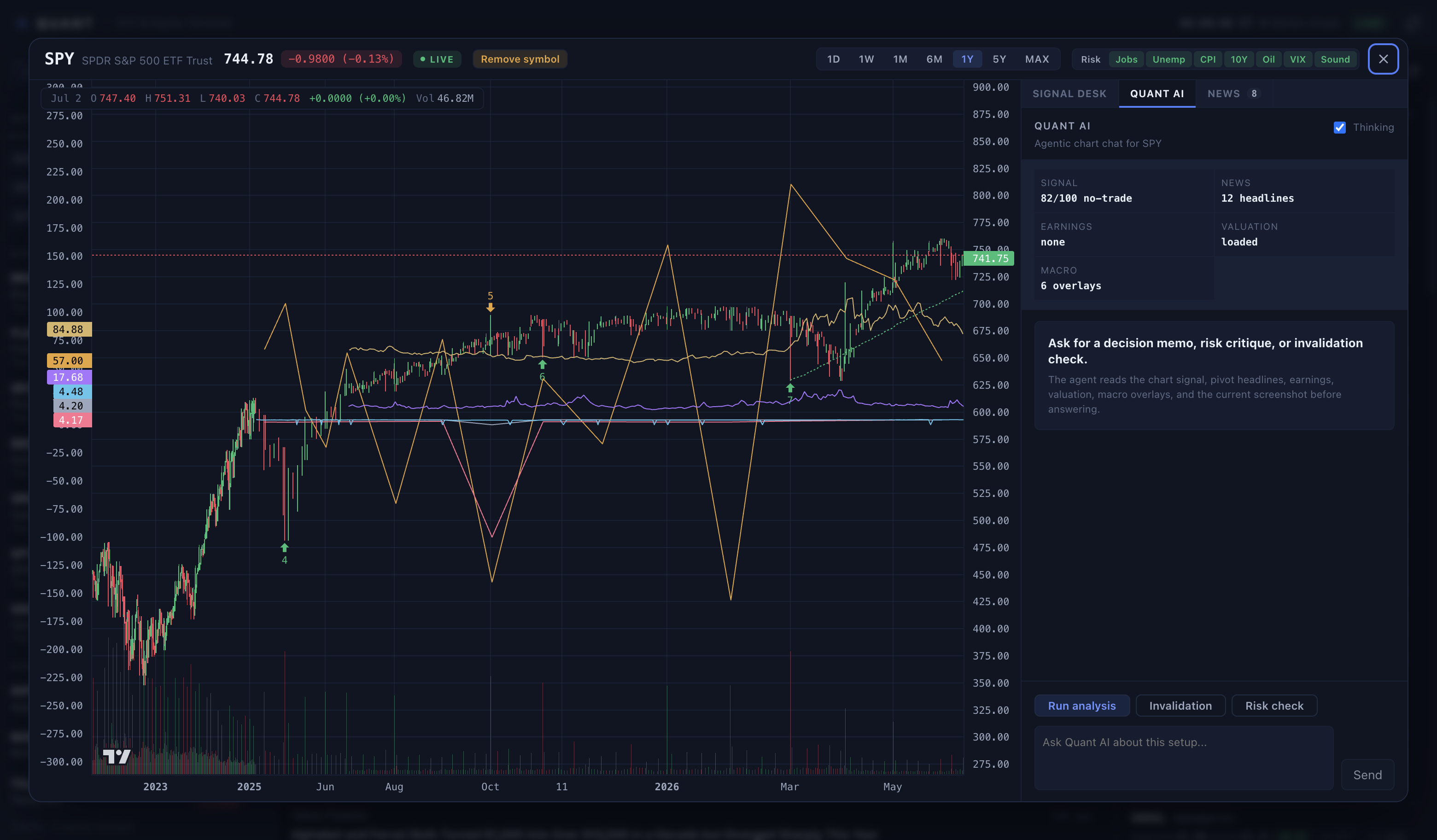
Quant AI is a dedicated chart tab. It hydrates the current symbol, chart range, signal evaluation, risk plan, pivot-linked news, earnings, valuation, active macro overlays, and chart screenshot context before producing a memo.
Local AI With Zero Cloud LLM API Cost
Quant AI does not require a paid cloud model provider.
You have three modes:
| Mode | Setup | Cloud LLM API Cost | Behavior |
|---|---|---|---|
| Deterministic fallback | None | $0 |
Quant returns a rules-based memo from the signal engine |
| Local LLM | Run LM Studio, llama.cpp, Ollama OpenAI mode, or a proxy | $0 |
Quant sends chart context to your local OpenAI-compatible server |
| Disabled | Leave local LLM off | $0 |
The AI tab remains usable through deterministic analysis |
Expected local server endpoints:
GET /healthPOST /v1/chat/completions
Example local setup:
export QUANT_LLM_ENABLED=1
export QUANT_LLM_BASE_URL=http://127.0.0.1:8080
export QUANT_LLM_MODEL=your-local-model-name
npm start
Windows PowerShell:
$env:QUANT_LLM_ENABLED="1"
$env:QUANT_LLM_BASE_URL="http://127.0.0.1:8080"
$env:QUANT_LLM_MODEL="your-local-model-name"
npm start
You can also configure this through onboarding. Saved LLM preferences are stored in Electron local app data as llm-settings.json.
Feature Map
| Area | Capability |
|---|---|
| Watchlist | Add ETFs or stocks, see prices, daily movers, and grouped ETF/stock sections |
| ETF holdings | Expand ETF holdings so news and earnings cover underlying companies |
| News | Pull public finance headlines and group them by selected market universe |
| Swing news | Group headlines around each detected chart swing high or swing low |
| Earnings | Show upcoming earnings for watched names and ETF holdings |
| Charts | Candlesticks, volume, ranges, pivots, support/resistance, risk overlay |
| Macro overlays | Jobs, unemployment, CPI, 10Y yield, oil, VIX |
| Signal Board | End-of-day scan for cup bases, moving-average order, highs, VCP, volume, MACD, rebounds, and relative strength |
| Signal Desk | Deterministic setup classification, confidence, blockers, risk plan |
| Quant AI | Agentic chat tab over chart, signal, news, earnings, valuation, macro context |
| Local persistence | Watchlist, saved Quant AI insights, LLM settings |
| Release builds | Runnable macOS and Windows folders under release/ |
Generated Showcase Visual
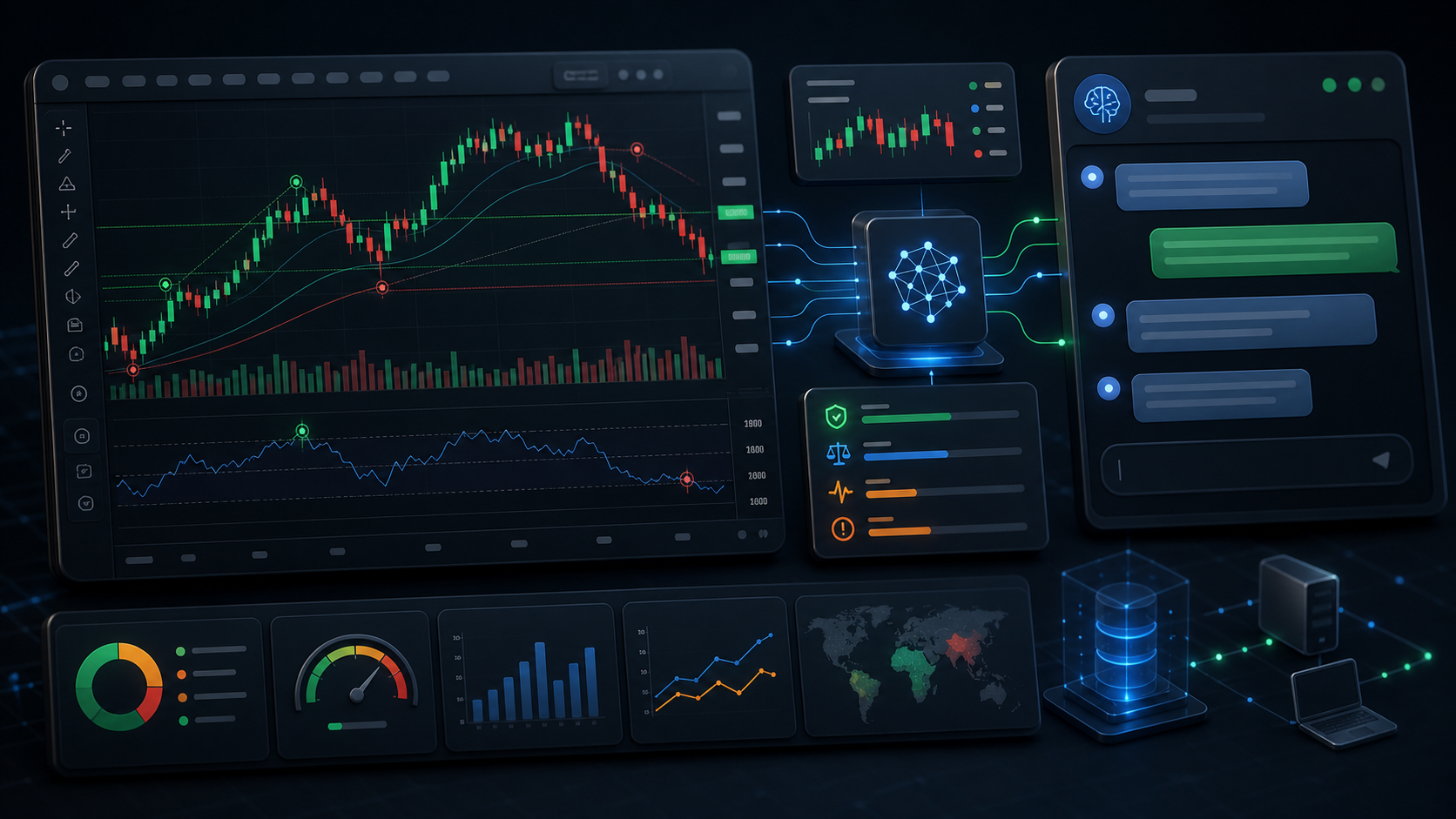
The image below is generated artwork for the README. It is not a literal app screenshot; the real screenshots above show the actual running UI.
Data Sources
Quant uses free public endpoints and bundled fallback data:
- Yahoo Finance chart, quote, search, valuation, and earnings endpoints
- Yahoo Finance RSS feeds
- Google News RSS
- FRED CSV endpoints for selected macro overlays
- Bundled sample chart, holdings, quote, news, and earnings data
No API key is required for the default experience.
Important limitations:
- Public endpoints can change, throttle, or fail.
- Data can be delayed, approximate, incomplete, or unavailable.
- Free endpoints should not be treated as trading infrastructure.
SAMPLEbadges mean bundled fallback data is being shown instead of live data.
Repository Structure
Quant/
  src/
    main/
      main.ts                 Electron lifecycle, window setup, IPC handlers
      preload.ts              Secure typed bridge exposed as window.quant
      services/
        chart.ts              Historical chart data loading
        earnings.ts           Earnings calendar data
        holdings.ts           ETF holdings lookup
        insightStore.ts       Saved Quant AI insight records
        llmSettings.ts        Optional local LLM settings persistence
        macro.ts              Jobs, unemployment, CPI, 10Y, oil, VIX overlays
        news.ts               Market news aggregation
        pivotNews.ts          News grouped around chart pivots
        quantAi.ts            Local LLM or deterministic Quant AI memo
        quotes.ts             Watchlist quote data
        signalScanner.ts      End-of-day technical signal scanner
        valuation.ts          Valuation snapshot and formula estimates
      data/
        etf-holdings.json     Offline holdings fallback
        symbol-directory.json Offline symbol search fallback
    renderer/
      App.tsx                 App shell
      store.tsx               Watchlist, quotes, holdings, modal state
      components/
        OnboardingWizard.tsx  First-run setup wizard
        ChartModal.tsx        Main chart workspace
        SignalBoard.tsx       Multi-symbol end-of-day signal scanner
        NewsFeed.tsx          Holdings-driven news panel
        Watchlist.tsx         Watchlist and movers panel
        chart/
          ChartCanvas.tsx     Lightweight Charts rendering
          QuantAgentPanel.tsx Agentic Quant AI chat UI
          QuantDecisionPanel.tsx Deterministic Signal Desk
          useMacroOverlays.ts Macro overlay data hook
      styles/                 App, chart, watchlist, news, earnings, analysis CSS
    shared/
      ipc.ts                  IPC channel names
      types.ts                Shared API and market data contracts
      quant.ts                Deterministic signal engine
      signals.ts              Multi-symbol pattern detector
  scripts/
    build.mjs                 esbuild bundle script
    package-release.mjs       Runnable macOS/Windows release folder and archive builder
    test-quant.mjs            Signal-engine tests
  docs/
    assets/
      screenshots/            Real app screenshots used in this README
      showcase/               Generated public repo visuals
  release/
    Quant-mac-arm64/          Runnable macOS app folder
    Quant-win-x64/            Runnable Windows x64 app folder
Architecture
Quant uses a standard Electron split:
| Layer | Path | Responsibility |
|---|---|---|
| Main process | src/main |
Fetches remote data, owns persistent stores, handles IPC, opens external URLs |
| Preload bridge | src/main/preload.ts |
Exposes a typed, narrow window.quant API to the renderer |
| Shared types | src/shared |
IPC contracts, market data models, deterministic signal engine |
| Renderer | src/renderer |
React UI, chart rendering, app state, onboarding, agent UI |
| Build scripts | scripts |
Build, tests, smoke screenshots, release packaging |
The renderer does not directly call remote market endpoints. It asks the Electron main process through the preload bridge. That keeps network access, filesystem writes, local LLM calls, and external link opening in the main process.
Common Commands
| Command | Purpose |
|---|---|
npm run build |
Bundle Electron main, preload, renderer, and static data into dist/ |
npm run typecheck |
Run TypeScript type checking without emitting files |
npm run test:quant |
Run deterministic signal-engine tests |
npm start |
Build and launch the desktop app |
npm run smoke |
Build, launch in smoke mode, and write dist/smoke.png |
npm run smoke:modal |
Build, launch with the SPY chart modal open |
npm run package:mac |
Build a runnable macOS app folder and zip archive in release/ |
npm run package:win |
Build a runnable Windows x64 app folder and zip archive in release/ |
npm run package:all |
Build macOS and Windows release folders plus zip archives |
Release Packaging
Quant includes a lightweight release packager at scripts/package-release.mjs. It does not require electron-builder.
The packager:
- Runs
scripts/build.mjs. - Uses the installed Electron runtime, or downloads the matching official Electron runtime into
.release-cache/if the local runtime is missing. - Creates a minimal Electron app payload under
resources/app. - Copies the compiled
dist/payload. - Writes a minimal runtime
package.json. - Copies
LICENSEandAUTHORS.mdinto the packaged app. - Produces runnable release folders and distributable zip archives under
release/.
Build both release folders:
npm run package:all
Outputs:
release/Quant-mac-arm64/Quant.app
release/Quant-mac-arm64.zip
release/Quant-win-x64/Quant.exe
release/Quant-win-x64.zip
Distribute the zip archives or the full release folders. Do not distribute Quant.exe alone because it depends on adjacent Electron runtime files.
On machines where global node/npm is unavailable but a working Electron runtime exists, the scripts can be run through Electron's Node mode:
ELECTRON_RUN_AS_NODE=1 /path/to/Electron.app/Contents/MacOS/Electron scripts/package-release.mjs --platform=darwin,win32
Troubleshooting
npm start opens no window in VS Code on Windows
Some VS Code terminals set ELECTRON_RUN_AS_NODE, which can make Electron behave like Node instead of launching a window.
PowerShell:
Remove-Item Env:ELECTRON_RUN_AS_NODE -ErrorAction SilentlyContinue
npm run build
& ".\node_modules\electron\dist\electron.exe" .
Local LLM cannot connect
Check the local model server:
curl http://127.0.0.1:8080/health
Then confirm the environment variables are set in the same shell that launches Quant.
To reopen onboarding:
./node_modules/.bin/electron . --onboarding
To reset saved LLM preferences, remove llm-settings.json from Electron's userData directory and launch Quant again.
Security Model
- Renderer loads local app files.
- Content Security Policy blocks arbitrary remote connections from the renderer.
- Main process validates external URLs before opening them.
- Market data and news are treated as untrusted remote content.
- Local LLM calls are disabled by default.
- No secrets are required for default operation.
- Treat market output as informational context, not execution advice.
Credits
Original code by David Wong, username DavidWProject.
Contributing
See CONTRIBUTING.md.
Security
See SECURITY.md.
License
MIT. See LICENSE.
Disclaimer
Quant is for research, education, and personal market monitoring. It is not investment advice, a broker, an execution system, or a source of guaranteed real-time market data.