freqtrade-gym
A customized gym environment for developing and comparing reinforcement learning algorithms in crypto trading.
System Structure
저장소별 전략/실행 조건 확인 필요
백테스트/분석 결과를 바탕으로 수동 판단
Editor Summary저장소 설명과 공개 메타데이터 기준으로 AI/LLM 또는 머신러닝 활용, Python 기반 구현, 암호화폐 거래 봇, 거래소 API/프레임워크 성격의 프로젝트로 파악했습니다. 확인 근거는 README, 저장소 토픽, 저장소 설명, GitHub 지표, 파이프라인 필드이며, 주요 데이터는 암호화폐 거래소 시장 데이터, 가격/거래량 데이터입니다. 전략/실행 조건은 저장소별 문서와 코드 확인이 필요하며, 실행 방식은 "백테스트/분석 결과를 바탕으로 수동 판단"라고 보수적으로 기록했습니다. GitHub 지표는 별 229개, 포크 44개입니다.
| Repository | hugocen/freqtrade-gym |
|---|---|
| Creator | hugocen |
| Stars / Forks | ★ 229 / 44 |
| License | GPL-3.0 |
| Last Updated | 2026-01-08 |
| Snapshot Date | 2026-07-08 (README below is a copy from this date) |
This is third-party open-source code. QuantField does not guarantee its behavior or safety. Review the code before installing or running it.
README
freqtrade-gym
This project is base on freqtrade
The project is in very early stage, so there are a lot of inconvenient part that you have to set up manually. I am working on the improvements.
Installation
1. freqtrade
Follow the freqtrade documentation to install freqtrade
Initialize the user_directory
freqtrade create-userdir --userdir user_data/
2. Pandas
pip install pandas
3. OpenAI Gym
pip install gym
4. Copy freqtrade-gym files
Baseline files
IndicatorforRL.py -> [freqtrade home]/user_data/strategies/IndicatorforRL.py
config_rl.json -> [freqtrade home]/config_rl.json
freqtradegym.py -> [freqtrade home]/freqtradegym.py
deep_rl.py -> [freqtrade home]/deep_rl.py
RLib
Copy first the baseline files.
LoadRLModel.py -> [freqtrade home]/user_data/strategies/LoadRLModel.py
rllib_example.py -> [freqtrade home]/rllib_example.py
Example Usage (baseline)
The usage example is deep_rl.py and the config for freqtrade and freqtrade-gym is config_rl.json and uses IndicatorforRL.py as feature extraction.
This demo is using openai baseline library to train reinforcement learning agents.
Baseline can install by
sudo apt-get update && sudo apt-get install cmake libopenmpi-dev python3-dev zlib1g-dev
pip install stable-baselines[mpi]
Download historical data
(Remember to download a little bit more data than the timerange in config file just in case.)
freqtrade download-data -c <config file> --days <Int> -t {1m,3m,5m...}
To match the example config_rl.json
freqtrade download-data -c config_rl.json --timerange 20201119-20201201 -t 15m
Move the IndicatorforRL.py into user_data/strategies (you should have user_data/strategies/IndicatorforRL.py)
Run the demo to train an agent.
python deep_rl.py
You can use tensorboard to monior the training process
logdir is defined in deep_rl.py when initializing the rl model
tensorboard --logdir <logdir>
This will look like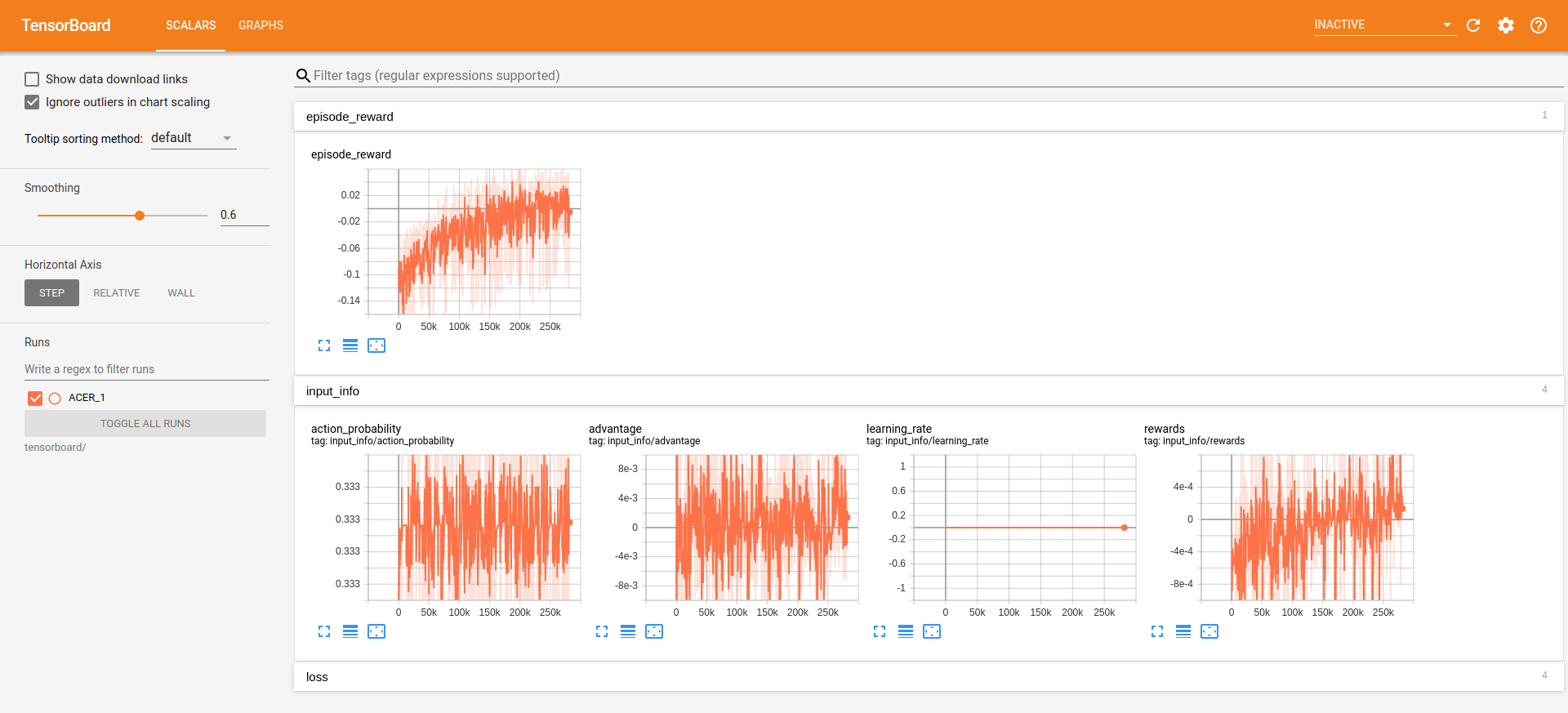
Example Usage (RLlib)
The usage example is rllib_example.py and the config for freqtrade and freqtrade-gym is config_rl.json and uses IndicatorforRL.py as feature extraction.
This demo is using RLlib to train reinforcement learning agents.
Baseline can install by
pip install 'ray[rllib]'
Run the demo to train an agent.
python rllib_example.py
Example of Loading model for backtesting or trading (baseline)
Move the LoadRLModel.py into user_data/strategies (you should have user_data/strategies/LoadRLModel.py)
Modified the class intial load model part to your model type and path.
Modified the populate_indicators and rl_model_redict method for your gym settings.
Run the backtesting
freqtrade backtesting -c config_rl.json -s LoadRLModel
Dry-run trading (remove --dry-run for real deal!)
freqtrade trade --dry-run -c config_rl.json -s LoadRLModelgProto
TODO
- Update the strategy for loadinf the trained model for backtesting and real trading. (baseline)
- The features name and total feature number(freqtradegym.py line 89) have to manually match in the indicator strategy and in freqtradegym. I