howtrader
Howtrader: A crypto quant framework for developing, backtesting, and executing your own trading strategies. Seamlessly integrates with TradingView and other third-party signals. Simply send a post request to automate trading and order placement. Supports Binance and Okex exchanges.
System Structure
저장소별 전략/실행 조건 확인 필요
거래소 API 기반 자동 주문 실행
Editor Summary저장소 설명과 공개 메타데이터 기준으로 Python 기반 구현, 암호화폐 거래 봇, 거래소 API/프레임워크, 백테스트 성격의 프로젝트로 파악했습니다. 확인 근거는 README, 저장소 토픽, 저장소 설명, GitHub 지표, 파이프라인 필드이며, 주요 데이터는 Binance, OKX, OHLCV/호가/체결 데이터입니다. 전략/실행 조건은 저장소별 문서와 코드 확인이 필요하며, 실행 방식은 "거래소 API 기반 자동 주문 실행"라고 보수적으로 기록했습니다. GitHub 지표는 별 932개, 포크 333개입니다.
| Repository | 51bitquant/howtrader |
|---|---|
| Creator | 51bitquant |
| Stars / Forks | ★ 932 / 333 |
| License | MIT |
| Last Updated | 2026-06-07 |
| Snapshot Date | 2026-07-08 (README below is a copy from this date) |
This is third-party open-source code. QuantField does not guarantee its behavior or safety. Review the code before installing or running it.
README
HowTrader
What does Howtrader means? It means how to be a trader, especially a quant trader.
HowTrader crypto quantitative trading framework, and was forked from VNPY, so the core codes、functions and useages are pretty similar to VNPY, but would be more easy to install and use. By the way, Howtrader fixes some bugs, add more functions and strategies to framework. We extend the TradingView signals and grid strategies to Howtrader and more codes.
Binance Spot API Ed25519 Key Configuration Guide
The Binance Spot WebSocket API mandates the use of the Ed25519 asymmetric encryption algorithm for signing. Therefore, you must use a self-generated method when creating API Keys. System-generated keys cannot be used for the Spot WebSocket interface.
Step 1: Create a Self-Generated API Key Log in to the Binance official website, go to Account → API Management, and click Create API. Select the Self-generated key type, as shown in the figure below.
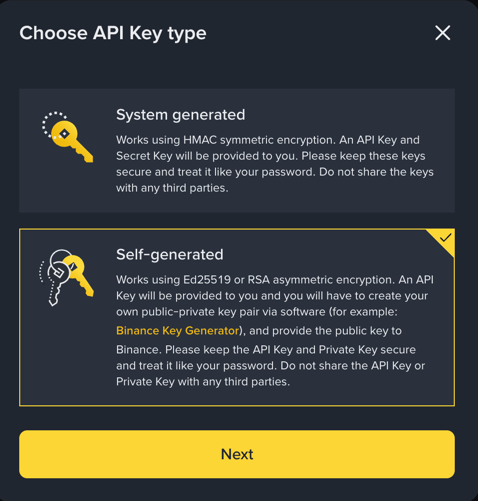
Click Next. You will now need to upload your self-generated Ed25519 public key.
Step 2: Generate an Ed25519 Key Pair Official Binance Tool (Recommended) Download the official asymmetric key generator from: https://github.com/binance/asymmetric-key-generator/releases (Note: This is an external GitHub link. If you cannot access it, please use the OpenSSL command-line method below.) Download and install the version corresponding to your operating system. After opening the software: Select the Ed25519 algorithm type, as shown in the figure below:
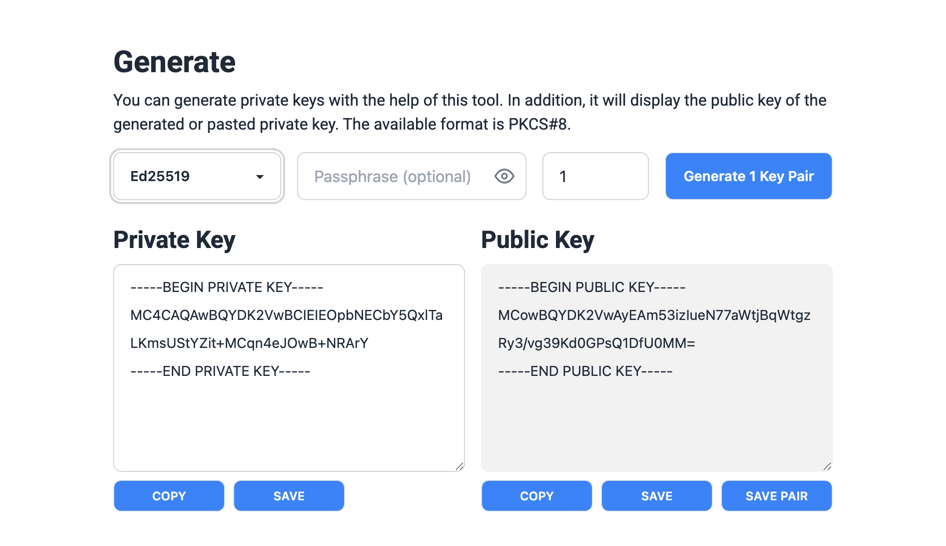
Click the Generate 1 Key Pair button to generate the key pair. Securely save the generated Public Key and Private Key.
Step 3: Complete API Creation and Configuration Copy the content of your generated public key (all text including -----BEGIN PUBLIC KEY----- and -----END PUBLIC KEY-----, removing all line breaks) and paste it into Binance's public key input field. Click Next to generate the API Key.
After that, edit the API permission: Check the Spot & Margin Trading permission.
Mandatorily enable IP whitelisting and add the IP address of the device running howtrader. Only check the necessary permissions. Do not enable high-risk permissions such as withdrawal or transfer. Click Save to complete the configuration.
Fill the API Key generated by Binance and your privately saved Private Key into the Binance Spot configuration in howtrader. Important Notes The Binance Futures API is not subject to this restriction. You can use standard system-generated API Key and Secret normally. If you have any questions about the spot configuration, feel free to consult me at any time.
Howtrader VS VNPY
some classes' definition are pretty different: for OrderData 、TradeData、ContractData, we replace float with Decimal to meet the precision, theses classes are defined in howtrader.trader.object module.
on_order and on_trade update sequence are different: in VNPY, ,the on_order is always updated before the on_trade if the order was traded. And in the cta strategy, the self.pos(the position data) was calculated in the on_trade callback. So if we want to get the latest self.pos value, we may need to define a variable to calculate the latest position data. To solve this issue, we push the on_trade before the on_order callback. check out the code to find out the details: